
Table of Contents
- Why Prolonged Sitting Causes Lower Back Pain
- How to Improve Posture While Sitting
- Stretches for Back Pain from Sitting
- Exercises for Lower Back Pain Relief
- How Often to Take Breaks from Sitting
- Set Up Your Desk for Back Pain Prevention
- When to Seek Professional Support
- Frequently Asked Questions
Last Updated: October 11, 2026
Why Prolonged Sitting Causes Lower Back Pain
When you sit for hours without moving, your lower back takes the strain. The discs between your vertebrae compress. Your hip flexors tighten. Your glute muscles weaken. All of this happens silently, until one day you stand up and feel sharp pain. (Source: research on the prevalence of sedentary behaviour)
The problem is staying in one position too long. Your spine needs movement and variation. When stuck in a chair, supporting muscles fatigue, posture collapses forward, and load shifts onto structures not designed to bear it for extended periods.
Poor postural habits compound over time. What feels fine at 9 AM becomes painful by 5 PM. Years at a desk cause your body to adapt to a dysfunctional position.
This is why you need to fix back pain from sitting with more than stretching. You need to retrain how you sit, move, and activate your core throughout the day.
How to Improve Posture While Sitting
Proper seated posture reduces stress on your lower back immediately.
Start by sitting all the way back in your chair. Your bottom should touch the backrest. Your feet should be flat on the floor, with knees at roughly 90 degrees.
The critical detail most people miss: engage your core gently before you settle into position. This isn’t about sucking in your stomach. It’s about activating the deep muscles that support your spine.
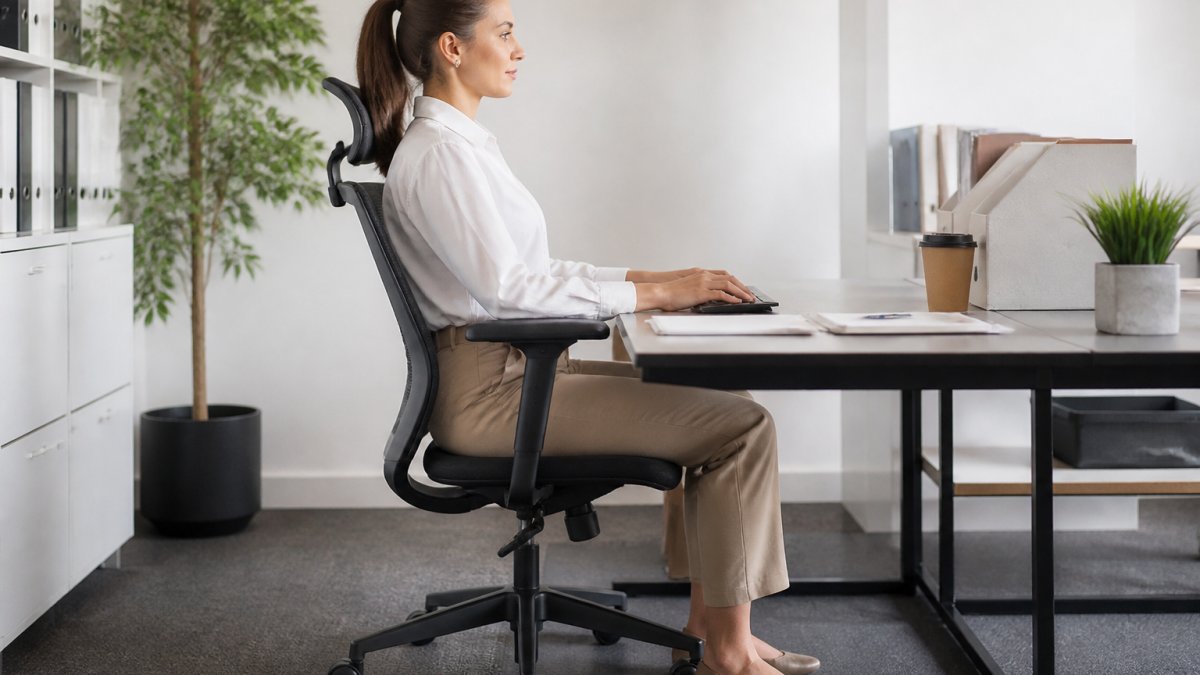
Your head should sit directly above your shoulders, with your screen at eye level. Looking down rounds your neck and entire spine forward, a common cause of sitting-related back pain.
A rolled-up towel or lumbar pillow behind your lower back helps maintain the natural curve of your spine. This small adjustment prevents the slouch that happens after an hour of sitting.
The real test of good seated posture: you should be able to maintain it without thinking about it for at least 20 minutes. If you’re constantly correcting yourself, your setup needs adjustment, or your core needs strengthening.
Stretches for Back Pain from Sitting
Stretching manages tightness in hip flexors, glutes, hamstrings, and spinal muscles. Hold each stretch 20-30 seconds without bouncing, breathing steadily. Perform 2-3 times daily during work breaks.
Knee-to-Chest Stretch
Sit upright, pull one knee toward your chest with both hands, keeping your other foot flat. Hold 20-30 seconds. Repeat on the other side, 2-3 times per side throughout your day.
Figure-Four Stretch for Hip Flexors
Sit upright, cross one ankle over the opposite knee, and gently lean forward keeping your back straight. Hold 20-30 seconds, repeat on the other side. Releasing tight hip flexors reduces the anterior pelvic tilt that causes lower back strain.
Seated Spinal Twist
A gentle spinal twist mobilises your thoracic spine and lower back, relieving tension that builds from static sitting.
Sit upright. Cross one arm across your body and place your opposite hand on the outside of your thigh. Gently twist your torso toward the side of your crossed arm, keeping your hips facing forward.
Hold for 20-30 seconds. Breathe steadily. Return to centre. Repeat on the other side.
The key is keeping your hips square. Don’t force the twist. A gentle rotation is more effective than aggressive stretching.
Stretches for back pain from sitting work best when combined with movement breaks and core strengthening. Stretching alone addresses tightness but not the underlying weakness that allows pain to return.
Exercises for Lower Back Pain Relief
Exercises build strength that prevents pain from returning. Start with 1-2 sets of 8-10 repetitions and progress gradually.
Seated Pelvic Tilts
Sit upright and tilt your pelvis forward to increase the curve in your lower back, then backward to flatten it. Perform 10-15 tilts in each direction daily, moving slowly and deliberately. This retrains the fundamental movement pattern most people with sitting-related pain have lost.
Glute Activation and Hamstring Work
Weak glutes are universal in people who sit for long hours. Sit upright and squeeze your glute muscles for 2-3 seconds, repeat 10-15 times. For hamstring strengthening, perform single-leg deadlifts: hinge at your hip extending one leg behind you while keeping your back straight, 8-10 repetitions per side. Strong glutes and hamstrings reduce lower back load.
How Often to Take Breaks from Sitting
Your spine needs movement variation throughout the day. Research shows alternating sitting and standing reduces back pain more effectively than either position alone. A practical, timed routine transforms vague advice into a habit you can follow.
Break Frequency by Pain Level
| Pain Level | Break Frequency | Duration | Best For |
|---|---|---|---|
| Severe or acute | Every 30 minutes | 3-5 minutes | Active pain or high-risk jobs |
| Moderate | Every 45 minutes | 3-5 minutes | Office work with existing discomfort |
| Mild or prevention | Every 60 minutes | 2-3 minutes | Healthy workers or early prevention |
Start with the frequency matching your pain level. As pain decreases, extend the interval gradually.
A Practical 3-Minute Desk Break Routine
During each break, follow this sequence. It requires no equipment and can be done in your office or at home. (Source: guidelines for maintaining good posture)
Minute 1: Movement and Posture Reset
Walk for 60 seconds to reactivate glutes and hamstrings and interrupt spinal compression. Then perform 10 gentle pelvic tilts: forward to increase lower back curve, backward to flatten it. Move slowly and deliberately.
Minute 2: Targeted Stretching
BOOK YOUR FREE 15 MINUTE CONSULTATION →
- Knee-to-chest stretch: Pull one knee toward your chest, 30 seconds per side.
- Spinal twist: Cross one arm across your body and gently twist, 15 seconds per side.
These release hip flexor and spinal tension.
Minute 3: Glute Activation and Posture Check
Perform 15 glute squeezes: squeeze for 2 seconds and release. Finish by standing tall with shoulders relaxed, head above shoulders, and core gently engaged, the posture you’ll return to at your desk.
Tracking and Adjusting Your Routine
Set a timer or calendar reminder. After two weeks, assess your pain level. If decreased, extend your break interval by 15 minutes. If worsened or unchanged, shorten the interval by 15 minutes. Don’t use breaks for screen time; walk, stretch, and move instead.
Sitting through pain without breaks is a common mistake. The longer you stay in one position, the more your muscles fatigue and your posture deteriorates. Small, frequent breaks prevent the accumulation of strain that leads to injury. If you find yourself skipping breaks because you’re busy, set a non-negotiable alarm. Your long-term spine health depends on consistency, not intensity.
Set Up Your Desk for Back Pain Prevention
Small adjustments to your desk setup eliminate much of the strain that causes back pain from sitting.
Chair Height and Foot Position
Sit with feet flat on the floor, knees at approximately 90 degrees. Adjust your chair so thighs are parallel to the floor. Dangling feet shorten hip flexors and cause lower back strain; this adjustment prevents anterior pelvic tilt.
Desk Height and Forearm Position
Adjust your desk so forearms rest parallel to the floor with elbows at roughly 90 degrees. Measure from elbow to fingertips while sitting; your desk should be approximately that distance below your elbow. This keeps wrists neutral and prevents forward shoulder posture.
Monitor Placement: Distance and Height
Position your screen 50-70 centimetres from your eyes. The top should be at or slightly below eye level so your gaze falls on the upper third. Looking down steeply flexes your neck and rounds your spine; looking up extends your neck and creates upper-back tension.
If you use a laptop, this is nearly impossible to achieve without an external monitor and keyboard. Laptops force your neck into flexion and your shoulders forward, a primary cause of sitting-related pain for remote workers. Invest in a separate monitor and keyboard if you work from a laptop regularly.
Keyboard and Mouse Placement
Keep your keyboard and mouse at elbow height, positioned directly in front of you. Your elbows should stay close to your body, not splayed outward. Reaching forward or to the side for your mouse forces your shoulder forward and rounds your upper back, which destabilises your entire spine.
If your keyboard and mouse are too far away or too high, you’ll compensate by leaning forward, a posture that compresses your lower back discs and fatigues your supporting muscles. Position them so your wrists remain neutral and your shoulders stay relaxed.
Lumbar Support: Placement and Adjustment
A rolled towel or small lumbar pillow behind your lower back maintains the natural inward curve (lordosis) of your spine. Without it, you’ll gradually slouch and flatten your lower back against the chair, a position that shifts load onto your discs and ligaments.
Place the support at the level of your lower back, roughly at the height of your belt line. It should be firm enough to maintain your curve but not so rigid that it forces an exaggerated arch. The goal is to prevent slouching, not to create artificial rigidity.
If you use a lumbar pillow, adjust its firmness so you feel supported without strain. A rolled towel (approximately 10-15 centimetres in diameter) works just as well and costs nothing. Replace it or re-roll it if it flattens over time.
The Setup Sequence
Adjust in this order: (1) chair height, (2) desk height, (3) monitor distance and height, (4) keyboard and mouse position, (5) lumbar support. Each adjustment affects the next. If you change one element, reassess the others.
Spend 10 minutes on this setup once. The investment pays dividends every working day. Poor ergonomics are preventable; fix your workspace once and benefit for years.
Take a photo of your setup from the side after you’ve adjusted it. Use it as a reference if you move your desk or chair, or if someone else uses your workspace. Consistency in setup prevents the gradual drift that leads to pain.
When to Seek Professional Support
Most sitting-related back pain improves with stretching, exercise, posture correction, and movement breaks. However, some pain requires professional assessment.
Seek support if:
- Pain persists beyond 2-3 weeks despite consistent stretching and exercise
- Pain radiates down your leg or into your foot
- You experience numbness or tingling in your legs or feet
- Pain worsens suddenly or becomes severe
- You have difficulty controlling your bowel or bladder
These symptoms may indicate a more serious condition that needs professional evaluation.
A movement professional can assess how you sit, stand, and move. They can identify specific movement patterns that contribute to your pain. The Menezes Method Pilates uses individual movement assessment to understand your unique situation, rather than applying a one-size-fits-all approach.
Personalised exercise selection and technique coaching accelerate recovery and prevent recurrence. A professional can also rule out conditions that require medical attention.
Back pain from sitting is preventable and treatable. If your pain persists or worsens, book your free 15-minute consultation to discuss how personalised movement assessment and exercise selection can help you move more confidently and reduce the strain sitting places on your lower back.
Frequently Asked Questions
Can sitting too long actually cause back pain?
Yes. Prolonged sitting places sustained pressure on the lumbar spine and discs, tightens hip flexors, and weakens glutes and core muscles. When sitting posture is poor, these effects intensify. Movement breaks every 30-60 minutes help reduce this strain. The Menezes Method teaches spinal awareness so you recognise when your position is creating unnecessary stress and can adjust before pain develops.
What stretches can help relieve back pain from sitting?
Knee-to-chest stretches, figure-four hip stretches, seated spinal twists, and hamstring stretches all target the tight muscles that sitting creates. Hold each stretch for 20-30 seconds without bouncing. Consistency matters more than intensity. The Menezes Method combines these stretches with breathing and spinal mobility work to address not just tightness but how your spine moves and stabilises.
How often should I take breaks from sitting during the workday?
Aim for movement breaks every 30-60 minutes. Stand, walk, or perform light stretches for 2-3 minutes. This interrupts sustained compression on the lumbar spine and resets muscle tension. If you sit all day, the cumulative effect of regular breaks is substantial. Pairing breaks with targeted exercises, like seated pelvic tilts or glute activation, amplifies relief and builds the spinal control needed to prevent recurrence.
What makes the Menezes Method different from standard Pilates for back pain?
The Menezes Method uses individual movement assessment and personalised exercise selection rather than one-size-fits-all routines. It emphasises quality of movement, spinal awareness, and how everyday habits, sitting, standing, bending, affect your back. The method incorporates the B-Line and SpinalCore system for targeted core control and teaches you to recognise and correct movement patterns that stress your spine, not just in class but throughout your day.